Which SEO Issues Should I Fix First? How to Prioritise SEO Fixes on a Small Business Website
Updated: 5 days ago
An SEO audit can produce a surprisingly long list of things that could be changed.
You might be told that your website has:
missing image alt text
duplicate page titles
broken internal links
slow pages
redirects
weak service pages
indexing problems
unclear headings
missing meta descriptions
pages with very little content
inconsistent location wording
low-performing blog posts
The temptation is to start at the top of the report and work down.
That is often the wrong approach.
The issue labelled “critical” by an SEO tool is not automatically the issue that matters most to your business.
A warning affecting one old blog article may deserve far less attention than a smaller problem affecting the service page responsible for most of your enquiries.
So if you are asking:
Which SEO issues should I fix first?
the answer should depend on:
commercial importance → severity → evidence → reach → effort → risk
—not simply whichever warning has the largest red number beside it.
This guide gives small businesses a practical way to decide what should be fixed now, what should follow next and what can reasonably wait.
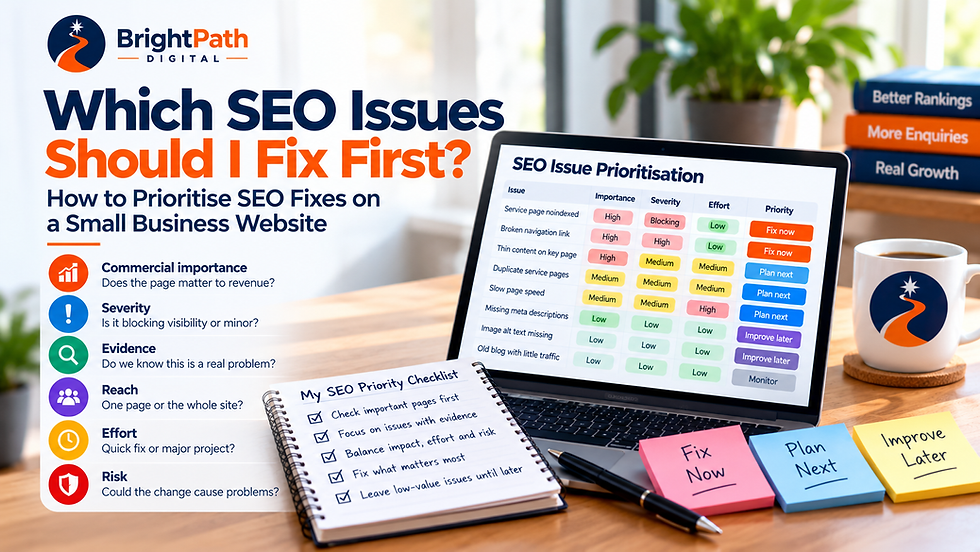
Quick Answer: Which SEO Issues Should I Fix First?
Start with SEO issues that are:
affecting commercially important pages
genuinely preventing or reducing visibility
supported by evidence rather than assumption
affecting multiple important pages or the wider site
reasonable to correct without disproportionate effort
unlikely to damage something that is already working
For example:
Important service page accidentally set to noindex
→ investigate immediately.
Main navigation points to a broken service URL
→ high priority.
Google Search Console shows an important page suddenly disappeared after a URL change
→ high priority.
SEO tool says one old blog image is missing alt text
→ probably not where I would start.
The objective is not to achieve:
0 SEO warnings
It is to improve the things most likely to affect whether the right customers can find, understand and use your website.
Why SEO Audit Severity Scores Can Be Misleading
Automated SEO tools can be extremely useful.
They can identify things such as:
broken URLs
redirect chains
duplicated titles
missing descriptions
crawl problems
indexing directives
canonical issues
internal-link problems
The weakness is not necessarily the detection.
It is the priority assigned to the finding.
Software does not always know:
which service generates most revenue
which page produces enquiries
whether a page matters commercially
whether a warning affects one URL or the entire site
whether the suggested change might damage an existing ranking
whether the business is about to redesign the website anyway
how much work the fix actually requires
Imagine an SEO tool finds:
78 pages missing image alt text
and:
1 important service page accidentally blocked from indexing
The first issue affects more URLs.
The second may matter dramatically more.
That is why SEO findings need business context.
If you want the broader distinction between different types of website reviews, see Website Audit vs SEO Audit: Which One Does Your Small Business Actually Need?
The Six Questions I Would Use to Prioritise an SEO Fix
Rather than assigning every issue an arbitrary score out of 100, assess it against six questions.
1. Commercial importance
How important is the affected page to the business?
2. Severity
What is the issue actually stopping or weakening?
3. Evidence
Do you know this is causing a problem?
4. Reach
How much of the website is affected?
5. Effort
How difficult is the fix?
6. Risk
Could changing it damage something that is already working?
Let's take those one by one.
1. Commercial Importance: Does the Affected Page Matter to the Business?
Start by identifying what the page actually does.
A website may contain:
homepage
main service pages
location pages
pricing pages
contact page
case studies
blog articles
old campaign pages
archive pages
legal pages
They do not all have equal commercial importance.
Imagine a plumber discovers two SEO problems.
Problem A
An old article about choosing a bathroom tap has a duplicated meta description.
Problem B
The Boiler Repairs page is accidentally excluded from Google.
Both are legitimate findings.
They do not deserve equal priority.
The boiler page directly represents a service the business wants customers to buy.
The old article may provide some useful supporting traffic, but it probably comes second.
Ask:
If this page completely disappeared tomorrow, how much would the business care?
That gives you useful context.
Pages closely connected to:
core services
products
enquiries
bookings
pricing
high-value locations
proven search traffic
normally deserve closer attention.
This is also why BrightPath recommends giving genuinely important services enough space to be properly explained rather than creating pages simply because another keyword exists.
2. Severity: Is the Issue Blocking Something or Merely Imperfect?
Not every SEO issue has the same consequence.
Compare:
Blocking
An important page has a noindex instruction.
Google cannot include it in normal search results while that instruction remains in place.
Material
The page can appear in search, but the main title and content are so unclear that customers and search engines struggle to understand its purpose.
Minor
The meta description is slightly longer than an SEO tool's preferred character count.
These are very different situations.
A useful severity question is:
What can no longer happen—or is materially harder—because this problem exists?
High-severity examples may include:
important pages unavailable to crawlers
accidental noindex
serious canonical mistakes
important URLs returning errors
broken navigation
major redirect mistakes after migration
important content removed unexpectedly
Lower-severity examples could include:
title wording that could be improved
a missing description
one unclear anchor
a decorative image with imperfect alt text
a heading that could be more descriptive
Lower priority does not mean:
never fix it.
It means:
do not fix it first merely because a tool found it.
3. Evidence: Do We Know This Is Actually a Problem?
This question eliminates a lot of wasted SEO work.
There is a major difference between:
“This might theoretically be better.”
and:
“We can see evidence that something is wrong.”
Evidence may come from:
Google Search Console
URL Inspection
website analytics
actual broken links
customer behaviour
confirmed indexing problems
visible search-result changes
website change history
server or crawl evidence
repeated customer confusion
Suppose somebody says:
Your homepage rankings dropped because the H1 is wrong.
Ask:
What evidence connects those two things?
Perhaps the ranking decline started immediately after the heading changed.
That is interesting.
Perhaps nothing changed on the page and the claim is based entirely on the fact that an SEO tool dislikes the wording.
That is considerably weaker evidence.
BrightPath's guide to finding SEO opportunities in Google Search Console follows the same principle:
evidence → relevance → page → improvement
rather than:
SEO tool warning → immediate rewrite.
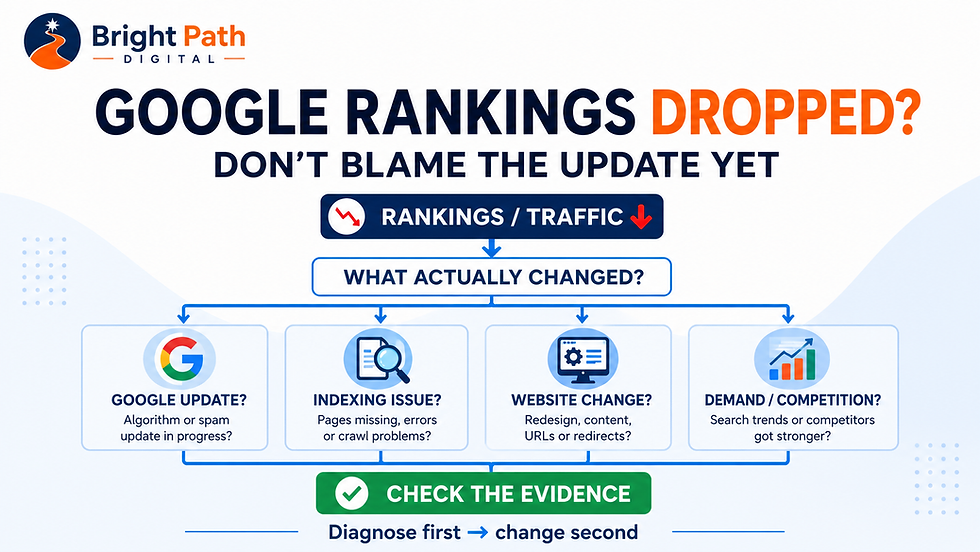
If a website has actually lost Google visibility, use the Google Rankings Dropped diagnostic process before making speculative changes.
4. Reach: Does the Problem Affect One Page or the Whole Website?
Reach matters.
Imagine you discover:
One blog article contains an outdated internal link.
That is a contained problem.
Now imagine:
Every navigation link points through an obsolete redirect structure.
That deserves more attention.
Likewise:
One duplicate title
is different from:
every service page has the same title.
Useful reach categories are:
Isolated
One low-value page.
Important-page issue
One commercially significant URL.
Section-wide
For example, every service or location page.
Site-wide
Navigation, template, indexing or structural issue affecting much of the website.
But do not let reach override commercial importance entirely.
A site-wide cosmetic issue can still matter less than a single blocking problem on your primary service page.
This is why prioritisation needs several dimensions rather than one score.
5. Effort: How Difficult Is the Fix?
Suppose two confirmed problems could improve an important page.
Fix A
Rewrite one vague title.
Effort: 10 minutes.
Fix B
Rebuild the entire website hierarchy.
Effort: potentially days or weeks.
The second problem might eventually matter more.
But Fix A could be completed immediately while Fix B becomes a planned project.
That creates a useful distinction:
priority
and:
sequence
are not always exactly the same.
A meaningful high-effort project may be the most important strategic issue.
That does not mean you should ignore worthwhile low-effort improvements while planning it.
Think in terms of:
Quick win
Important enough to matter and easy to fix.
Planned improvement
Worth doing but requires more effort.
Strategic project
High impact but needs broader planning.
Low-value tidy-up
Possible improvement, but not worth interrupting more important work.
A good SEO plan can contain all four.
6. Risk: Could the Fix Damage Something Already Working?
This is the category many automated recommendations ignore.
Changing something is not automatically safer than leaving it alone.
Imagine a service page already receives:
useful impressions
relevant clicks
enquiries
external links
strong internal links
An SEO recommendation says:
Change the URL because the new one contains a better keyword.
That change creates risk.
You could affect:
existing links
redirects
crawling
indexing
bookmarks
external backlinks
analytics history
What is the benefit?
If the answer is:
The URL looks slightly more SEO-friendly.
I probably would not change it.
Google explicitly advises against radical changes when a page is already performing well and recommends focusing on meaningful improvements rather than speculative quick fixes.
The same principle applies to:
changing established URLs
merging pages
deleting content
completely rewriting pages
altering internal-link structures
replacing page titles
changing navigation
Ask:
What are we trying to improve—and what might we accidentally lose?
Our guide to reviewing SEO before redesigning a website is particularly relevant when proposed fixes involve URLs, page structure or removing content.
A Simple SEO Prioritisation Framework
For every issue, record:
Issue | Page | Commercial importance | Severity | Evidence | Reach | Effort | Risk | Decision
For example:
Example 1
Issue: Service page accidentally noindexed Commercial importance: High Severity: Blocking Evidence: Confirmed in URL Inspection Reach: One critical page Effort: Low Risk: Low Decision: Fix immediately
Example 2
Issue: Ten blog posts have slightly long meta descriptions Commercial importance: Low–medium Severity: Minor Evidence: Tool warning only Reach: Ten pages Effort: Medium Risk: Low Decision: Review later, only where snippets are genuinely weak
Example 3
Issue: Old site migration created redirect chains across service pages Commercial importance: High Severity: Material Evidence: Confirmed crawl Reach: Multiple important pages Effort: Medium Risk: Medium Decision: Plan and correct
Example 4
Issue: Rewrite the URL of an established page that already performs well Commercial importance: High Severity: No confirmed problem Evidence: Speculative Reach: One important page Effort: Medium Risk: High Decision: Leave alone unless stronger evidence appears
That fourth example is important.
Sometimes the right SEO decision is:
do nothing.
What Should Usually Be Investigated First?
There is no universal ordering for every website.
But for a typical small-business site, I would normally investigate issues in approximately this sequence.
Priority 1: Can Google access and index the important pages?
Check:
accidental noindex
blocked resources where relevant
important 404s
incorrect canonicalisation
broken redirects
important pages removed
server or availability problems
If a commercially important page cannot participate properly in search, polishing its meta description is not the immediate concern.
Our Discovered vs Crawled – Currently Not Indexed guide explains why different indexing statuses require different investigations rather than repeatedly pressing Request Indexing.
Priority 2: Is the correct page targeting the correct customer need?
Check:
service-page purpose
search intent
overlapping pages
wrong page appearing for a query
thin or unclear service information
A perfectly indexed page can still be a poor answer.
Priority 3: Are important pages connected properly?
Review:
navigation
internal links
orphaned important pages
old URLs
redirect chains
links from useful informational content into commercial pages
If you need a structured process, use BrightPath's internal link audit guide.
Priority 4: Can somebody understand and trust the page?
SEO does not stop when somebody clicks.
An important service page should explain:
what is offered
who it is for
where relevant, where it is available
useful pricing or quotation information
proof
next step
A page attracting traffic but generating no business may have a different problem from one that receives no impressions.
Priority 5: Improve the search appearance where evidence supports it
Then look at:
page titles
meta descriptions
headings
snippets
useful descriptive wording
These can matter.
But do not automatically place them ahead of bigger structural or content problems.
An Example: Ten SEO Warnings, One Afternoon Available
Imagine an electrician has four hours available.
The audit identifies:
Main Commercial Electrical page accidentally noindexed
Three broken links in old blog articles
Homepage title could be clearer
Fifteen missing meta descriptions
One key service page has almost no useful content
Two location pages largely duplicate each other
Four images lack alt text
Old URL redirects through two intermediate URLs
Blog article ranks for an important commercial query but does not link to the relevant service
Sitemap contains two obsolete URLs
Do not simply work from 1 to 10.
I would start by asking:
First
Fix the accidental noindex.
It blocks an important commercial page.
Next
Review the weak key service page.
It represents something the business wants customers to buy.
Then
Correct the redirect issue and obsolete sitemap entries where appropriate.
Then
Add the useful contextual internal link from the relevant blog article.
Then
Review the homepage title if there is a genuine clarity opportunity.
Later
Work through lower-impact metadata and image issues.
That order is based on likely consequence, not the number of warnings.
What About “Quick Wins”?
Be careful with this phrase.
SEO advice often describes something as a quick win because it is easy.
Easy does not automatically mean worthwhile.
Changing 30 meta descriptions may be easy.
But if the website's main service page is unavailable to Google, the metadata exercise is not the priority.
A better definition is:
Quick win = worthwhile impact + relatively low effort + acceptable risk.
All three matter.
When Should You Ignore an SEO Tool Warning?
Do not ignore tools casually.
Investigate the warning.
But it may reasonably end up as no action when:
the tool's recommendation does not fit the page
the affected page has no meaningful business or search purpose
the warning is cosmetic
the suggested fix creates more risk than benefit
the page already performs strongly
Google's own guidance does not support the supposed rule
the issue has no convincing user or search consequence
For example:
Your article only uses the focus keyword four times.
That is not, by itself, a reason to repeat the phrase.
Your meta description is 163 characters instead of 160.
That does not automatically make rewriting it the most useful SEO task.
Your article does not contain 2,000 words.
Google does not require arbitrary word counts.
Use tools for evidence and discovery.
Do not outsource judgement to the score.
Do Not Make Ten SEO Changes at Once
This matters particularly when you are trying to understand what improves performance.
Imagine you simultaneously change:
title
H1
body copy
URL
internal links
images
page layout
CTA
schema
navigation
Traffic improves.
Which change helped?
You probably do not know.
Traffic falls.
Which change caused the problem?
Again, you may not know.
Where practical, make the changes that the evidence supports and keep a simple change record.
For important pages, record:
Date | URL | Change | Reason | Evidence | Result
This change record should also inform your regular SEO reporting. Our guide to what should be included in an SEO report explains how to distinguish completed work, observed results, unresolved issues and the next priorities.
Then allow enough time for Google and customers to respond.
Google notes that some changes can appear relatively quickly while others may take weeks or months to be fully reflected.
Do not assume:
changed Monday → ranking unchanged Friday → change failed.
What If Your Rankings Have Suddenly Dropped?
Do not treat a sudden decline as a normal optimisation exercise.
Diagnose it.
Check:
Did clicks fall?
Did impressions fall?
Which pages changed?
Which queries changed?
Was the issue site-wide or page-specific?
Did you recently redesign or change URLs?
Are important pages still indexed?
Did search demand change?
Was a confirmed Google update running?
Is there a manual action or security issue?
Google's own traffic-drop guidance recommends looking at patterns in Search Console before deciding what caused the decline.
BrightPath's Google Rankings Dropped? guide takes the same evidence-first approach.
Do not spend three days rewriting headings when your analytics tracking is actually broken.
What If the Website Has Hundreds of SEO Issues?
Do not panic.
Large audit reports often contain repeated instances of the same underlying problem.
For example:
84 duplicate titles
might really mean:
one website template produces poor titles across a section.
53 redirect warnings
might stem from:
one old migration pattern.
40 poorly linked pages
might indicate:
one structural navigation problem.
Group related findings.
Instead of:
84 tasks
you may have:
1 template fix.
Instead of:
53 tasks
you may have:
1 redirect clean-up project.
Look for causes, not only symptoms.
A Practical Four-Level Priority System
I would keep the final reporting simple.
Priority 1 — Fix or investigate now
Use when an issue is:
commercially important
severe
supported by strong evidence
blocking customers or search visibility
likely to have worthwhile impact
Priority 2 — Plan next
Use when the issue matters but:
requires more work
affects several pages
needs careful implementation
contains some change risk
Priority 3 — Improve when practical
Useful refinements that could strengthen:
clarity
search appearance
internal linking
content
supporting pages
but are not currently blocking something important.
Priority 4 — Monitor or leave alone
Use where:
evidence is weak
the issue is largely cosmetic
the business impact is negligible
fixing it creates unnecessary risk
the page already performs satisfactorily
That final category matters.
A useful audit should be willing to say:
This does not currently deserve your time.
Should You Fix SEO or Improve Conversion First?
Sometimes neither is the complete answer.
Suppose Google Search Console shows an important service page receiving:
relevant impressions
useful clicks
stable visibility
but the website generates very few enquiries.
More SEO may not be the first priority.
Investigate:
service clarity
pricing
trust
contact routes
calls to action
forms
mobile experience
BrightPath's guide to why a small-business website is not getting enquiries explains why visibility and conversion need to be separated rather than treating every commercial problem as SEO.
This is also where a broader website audit can make more sense than a narrowly technical SEO review.
When Is an SEO & Local Visibility Audit the Right Next Step?
Consider an SEO & Local Visibility Audit when the main concern is:
weak search visibility
unclear service-page structure
poor local relevance
headings
service content
internal links
location signals
content gaps
The objective should be:
find the SEO improvements most worth doing
not:
produce the longest possible list of SEO errors.
When Is a Full Website Audit Better?
Choose a broader Full Website Audit & Improve Plan when you are not confident that SEO is the only issue.
For example, you may also have concerns around:
clarity
copy
trust
customer journey
mobile experience
enquiry routes
navigation
content gaps
BrightPath's current Full Website Audit is specifically designed to separate individual findings from wider patterns and turn them into a prioritised roadmap rather than leaving the business with an overwhelming checklist.
That distinction is important.
Sometimes the highest-priority problem on a website is not an SEO problem at all.
A 15-Minute SEO Priority Exercise
Take the five issues you are currently considering.
For each one write:
Commercial importance
High / Medium / Low
Severity
Blocking / Material / Minor
Evidence
Confirmed / Probable / Speculative
Reach
Site-wide / Important pages / One page
Effort
Low / Medium / High
Risk
Low / Medium / High
Then ask:
Which confirmed issue affects the most commercially important part of the website, creates the biggest genuine barrier and can be corrected with acceptable effort and risk?
Start there.
Not with:
Which warning looks reddest?
Frequently Asked Questions
Which SEO issues should I fix first?
Prioritise confirmed problems affecting important commercial pages, especially where the issue is preventing crawling, indexing, understanding or a useful customer journey. Then consider reach, effort and change risk before deciding the sequence.
Should I fix every SEO audit error?
No.
Audit findings need context.
Some require immediate attention.
Some are useful refinements.
Some may not justify any action.
Are critical SEO-tool errors always critical?
No.
A tool's severity classification reflects its own rules.
You still need to consider the affected page, commercial importance, evidence and actual consequence.
Should I fix technical SEO before content?
Not automatically.
A serious technical barrier can come first.
But if the site is technically accessible and the real weakness is poor service content, improving the content may matter more.
Diagnose the actual problem.
Should I fix easy SEO problems first?
Only when they are also worthwhile.
“Easy” and “important” are not synonyms.
How many SEO changes should I make at once?
There is no fixed number.
For important pages, avoid making unnecessary simultaneous changes when doing so would make the outcome difficult to understand.
What if an important page already ranks well?
Be cautious about changing it purely to satisfy a tool.
Review what is working, identify a genuine reason for the change and consider the possible downside before altering established URLs, structure or content.
How soon should I measure the result?
It depends on the change.
Some website changes are reflected relatively quickly, while others can take weeks or longer for Google to recrawl, reassess and incorporate into search results.
Final Thought: An SEO Audit Should Produce Decisions, Not Just Issues
Finding faults is easy.
Prioritising them is the valuable part.
A useful SEO review should help you answer:
What is genuinely wrong?
What evidence do we have?
Which pages matter most?
What could the problem be costing us?
What is realistic to fix?
What carries risk?
What should happen first?
and occasionally:
What should we leave alone?
The objective is not a website with a perfect SEO-tool score.
It is a website where the important pages can be found, understood and used by the people the business actually wants to reach.
If search visibility is the main problem, BrightPath Digital's SEO & Local Visibility Audit provides a focused review of the site's visible SEO foundations and improvement opportunities.
If the problems appear broader than SEO, the Full Website Audit & Improve Plan reviews the wider website and provides a prioritised improvement roadmap.
Diagnose first.
Prioritise second.
Fix what matters.
Then measure what changed.
Google's own Search documentation supports that restrained approach: investigate actual evidence, avoid unnecessary radical changes and focus on sustainable improvements that make sense for users rather than chasing every SEO warning.


Comments