Why Your Small Business Website Is Not Getting Enquiries
Updated: Sep 14
Quick answer
If your small business website is not getting enquiries, the problem is usually not one single thing. It is often a mix of unclear messaging, weak trust signals, poor local SEO, confusing contact routes, slow decision-making content, or visitors not feeling confident enough to take the next step.
A website can look professional and still fail to generate enquiries if people cannot quickly understand what you do, where you work, why they should trust you, and how to contact you.
For many small businesses, the best place to start is not more advertising. It is finding out where the enquiry journey is breaking down.
At BrightPath Digital, our £99 Digital Presence Review helps small businesses identify what may be stopping their website from turning visitors into real enquiries.
Your website may be visible, but is it convincing?
Getting someone onto your website is only the first step.
Once they arrive, they are usually asking themselves a few quick questions:
Is this business relevant to what I need?
Do they work in my area?
Do they look trustworthy?
Can I understand what they offer?
Is it easy to contact them?
Do I feel confident enough to take the next step?
Visibility itself can also behave differently from website traffic. Read our guide to zero-click search if your Google impressions are rising but visits are not.
If your website does not answer those questions quickly, visitors may leave without calling, messaging or filling in a form.
That does not always mean your service is wrong. It often means your website is not giving people enough confidence at the right moment.
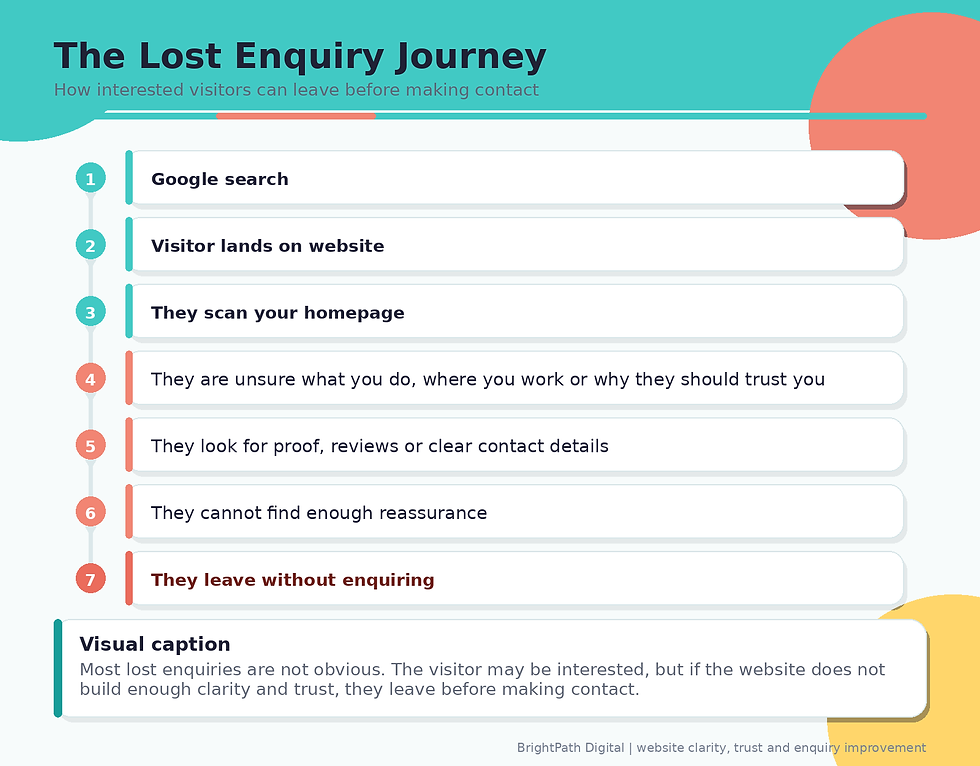
The lost enquiry journey
A lost enquiry usually happens in stages. A potential customer may not consciously think through every step, but this is often what happens.
1. Your message is not clear enough
Many small business websites try to say too much at once.
They list services, locations, background information and general claims, but they do not quickly explain the most important point:
What do you do, who do you help, and what should the visitor do next?
A clear homepage should make this obvious within seconds.
If the homepage is where the customer journey is breaking down, use our small business homepage checklist to review the opening message, service routes, proof, trust signals and calls to action in order.
For example, instead of saying:
Quality services for homes and businesses
A clearer version would be:
Website design and digital presence support for small businesses across Cheshire, Wirral, Merseyside and North Wales.
The second version tells the visitor what the business does, who it helps and where it operates.
If your website is vague, people may assume you are not the right fit, even when you are.
2. Your website does not build enough trust
Trust is one of the biggest reasons a visitor becomes an enquiry.
Before someone contacts a small business, they often want reassurance that the business is real, reliable and suitable for the job.
Useful trust signals include real contact details, visible reviews, client stories, examples of work, professional branding, a clear service area and wording that feels current and specific.
This article looks at trust as one reason enquiries may be lost. For the full guide to trust signals and clearer wording, read How Clear Messaging and Trust Signals Boost a Small Business Website.
Trust does not need to mean over-polished or corporate. For many small businesses, honest and practical is more convincing than generic marketing language.
That distinction is becoming more important as AI makes “over-polished” marketing language available to almost everybody. AI and Customer Trust: AI Can Make Every Business Sound Professional—So Who Do Customers Trust? explains why the evidence behind your claims — reviews, real work, people, experience and transparent information — increasingly matters more than simply sounding professional.
A local customer is often looking for a business that feels reliable, approachable and easy to deal with.
You can also strengthen trust by adding examples of previous work. See Client Stories
3. Your calls to action are too weak or too hidden
A call to action is the instruction that tells a visitor what to do next.
Examples include:
Request a quote
Book a call
Send us a message
Request your Digital Presence Review
Ask a question
Contact us today
If your calls to action are only at the bottom of the page, some visitors may never reach them.
A good small business website should include clear contact routes throughout the page, especially after important sections where the visitor may be ready to act.
For example:
After explaining the service
After showing proof or testimonials
After answering common questions
After explaining pricing or next steps
At the end of the page
Price uncertainty can itself stop someone reaching that next step. If customers cannot tell whether your service is even roughly within budget, our guide to whether you should put prices on your small business website explains how fixed prices, ranges, starting prices and pricing guidance can help qualify enquiries without forcing every service into one rigid figure.
Your CTA should also match the visitor’s situation.
If they are ready to buy, “Contact us” may work. If they are unsure, “Ask a question” may feel easier. If they know something is wrong but do not know what, “Request a Digital Presence Review” is more relevant.
Not sure where your enquiries are being lost?
If your website is already attracting visitors but they are not becoming calls, bookings or enquiries, our Conversion & Customer Journey Audit looks specifically at where people may be hesitating, becoming confused or abandoning the journey. We review your calls to action, contact routes, forms, navigation, mobile journey and trust points, then provide a practical list of improvements to prioritise.
4. Visitors cannot quickly understand where you work
For local businesses, location matters.
If someone lands on your website and cannot tell whether you cover their area, they may leave.
Your website should make your service area clear without creating thin or repetitive location pages.
Useful places to mention location include:
Homepage introduction
Service pages
Contact page
Footer
Google Business Profile
Blog content, where relevant
Image alt text, where natural
For BrightPath Digital, for example, it makes sense to reference areas such as Cheshire, Wirral, Merseyside, Runcorn, Wallasey and North Wales where relevant and truthful.
The key is to be specific, but not spammy.
If your business covers several towns, that does not necessarily mean each one needs another URL. Read our guide to whether you should create a website page for every town you serve before multiplying your location pages.
5. Your SEO settings may not match what people search for
Sometimes a website does not get enquiries because the right people are not finding the right page in the first place.
Missing, vague or duplicated SEO settings can make it harder for search engines and customers to understand what a page is about.
This article only covers SEO settings as one possible enquiry barrier. For the full Wix checklist, read SEO Settings for Small Businesses.
6. Your contact options may create friction
If someone is ready to enquire, do not make them work hard.
Common contact problems include:
Contact details only shown on one page
Forms asking for too much information
No phone number where a phone call would be expected
No clear email address
Buttons that say vague things like “Submit”
Broken links
Social media links that take people away from the website
No reassurance about what happens after they enquire
A better contact section might say:
Tell us what you need help with and we will come back to you with a practical next step. No pressure, no jargon.
That feels easier than a cold, generic contact form.
You can contact BrightPath Digital here Contact BrightPath Digital
7. Your website talks about services, but not problems
Many small business websites list what they do, but they do not connect those services to the customer’s problem.
For example, instead of only saying:
Website design SEO Google Business Profile setup Ongoing support
It is stronger to explain the outcomes:
We help small businesses look more professional online, appear more clearly in local searches and make it easier for customers to enquire.
People usually care less about the technical service and more about the result.
They want to know:
Will this help me get found?
Will this make my business look more professional?
Will this make it easier for customers to contact me?
Will this save me time?
Will this help me stop missing opportunities?
Your website should answer those questions clearly.
8. Your pages may be too passive
A passive website gives information but does not guide the visitor.
An effective small business website should gently lead the visitor from problem to solution.
A strong page usually follows this pattern:
Explain the problem
Show that you understand the visitor’s situation
Explain the service or solution
Build trust with proof or reassurance
Answer common questions
Give a clear next step
If your page only describes your business, it may not be doing enough to convert interest into action.
9. You may not have enough proof
People are naturally cautious online.
Before they contact a business, they often look for signs that other people have trusted you before.
Proof can include:
Testimonials
Case studies
Client stories
Before-and-after examples
Screenshots of work
Review snippets
Photos
Years of experience
Clear process explanations
Professional credentials or relevant background
You do not need dozens of case studies to start. Even one or two clear client stories can make a website feel more credible.
BrightPath applies the same principle to our own site. Our website audit case study shows a real Audit & Improve customer journey from an established website that seemed acceptable to the owner through to the evidence and decision that followed the review
Add them where they support the decision, not just on a separate page.
For example, a service page could include a short client example before the final CTA.
10. Your website may not match your wider online presence
Your website is only one part of your digital presence.
Customers may also see your business on:
Google Business Profile
Facebook
LinkedIn
Apple Maps
Bing Places
Local directories
Review platforms
Online adverts
Email signatures
Customers can form an impression from those channels before they ever reach your website. Our guide to what customers see before they visit your website explains why brand consistency extends far beyond colours and a logo.
Social media can also be where the enquiry journey begins. If your posts are already attracting likes, comments or views but those people are not becoming customers, Why Your Social Media Gets Likes but No Enquiries looks at the earlier stages of that journey — from the audience you attract and the next step you offer through to the page somebody reaches on your website.
If your business name, phone number, address, service area, opening hours or messaging are inconsistent, it can create doubt.
It can also make it harder for search engines to understand and trust your business information.
Your website should act as the central source of truth. If the mismatch is mainly across Google Maps, Apple Maps, Bing Places or directories, read Local Business Listings UK.
Quick self-check: why are enquiries being lost?
Ask yourself these questions:
Can a visitor understand what we do within five seconds?
Is our service area obvious?
Are our contact details easy to find?
Do we show enough proof that we are trustworthy?
Are our calls to action clear and repeated naturally?
Do our pages answer the questions customers actually ask?
Are our SEO settings complete and relevant?
Does our website look consistent with our Google Business Profile and social media?
Would a cautious customer feel confident contacting us?
Do we know which pages are helping and which are not?
If you are unsure about several of these, your website may be leaking enquiries.
Do you need a new website, or just better improvements?
Not every underperforming website needs to be replaced.
Sometimes the biggest gains come from improving what is already there.
You may need a full redesign if:
The website looks outdated
It is difficult to edit
It does not work well on mobile
The structure is confusing
The branding no longer fits the business
The pages are too thin or poorly organised
You may need targeted improvements if:
The site looks acceptable but does not convert
The messaging is unclear
The SEO settings are incomplete
The contact routes are weak
The site lacks proof or trust signals
Your local presence is inconsistent
That is why a review can be useful before committing to bigger spend.
If a full rebuild does appear to be the right answer, check what the current website has already earned before replacing it. Our guide to reviewing SEO before a website redesign covers existing rankings, useful pages, URLs, redirects, internal links and the checks worth completing before the new site goes live.
If you are trying to make that decision now, our guide to whether you should redesign your website or improve the one you have gives you a practical framework for deciding which option makes better sense.
How BrightPath Digital can help
BrightPath Digital helps small businesses improve how they appear online, how clearly they explain what they do and how easily customers can contact them.
Our £99 Digital Presence Review looks at your website and wider online presence with a practical focus on visibility, trust and enquiries.
We review areas such as:
Website messaging
Homepage clarity
Contact routes
Trust signals
Basic SEO settings
Local search visibility
Google Business Profile alignment
Consistency across your digital presence
Practical next-step recommendations
The aim is simple: to help you understand what may be holding your website back and what to improve first.
Frequently asked questions
Why is my website getting visitors but no enquiries?
Your website may be unclear, lack trust signals, hide the next step, load poorly on mobile or fail to explain why someone should contact you. Traffic only helps if the page builds enough confidence to act.
Should I redesign my website if it is not getting enquiries?
Not always. Some websites need a rebuild, but many can improve with clearer messaging, stronger calls-to-action, better service pages, improved trust signals and more visible contact routes.
What should I check first?
Start with the homepage message, main service pages, mobile layout, contact options, reviews, examples of work and basic SEO settings.
Can BrightPath Digital help identify the problem?
Yes. A £99 Digital Presence Review checks your website, messaging, SEO foundations, trust signals and enquiry journey, then gives you a prioritised action plan.
Final thought
If your small business website is not getting enquiries, do not assume the answer is more traffic, more adverts or a complete rebuild.
Start by checking whether your website is clear, trustworthy, easy to use and properly connected to your wider online presence.
A good website should not just exist. It should help people find you, understand you, trust you and contact you.
If you are not sure where the problem is, BrightPath Digital can help you find it.
Request your £99 Digital Presence Review Contact BrightPath Digital
Useful next reads:


Comments