Google Search Console Monthly Checklist for Small Businesses
Updated: 23 hours ago
Google Search Console can quickly become overwhelming for a small business owner. There are clicks, impressions, positions, indexing reports, warnings and pages that appear to be excluded. The job is not to analyse everything. The job is to check the right areas once a month, spot anything that could affect visibility or enquiries, and choose the next practical improvement.
Monthly Search Console checks for small businesses: once a month, check for warnings, compare the last 28 days with the previous 28 days, review the searches people used, check which pages are appearing, review any available Generative AI performance data, confirm important pages are indexed, then choose one or two practical improvements. Do not chase every number. Use the data to decide what to fix next.
What is Google Search Console for small businesses?
Google Search Console is a free tool that shows how your website performs in Google Search.
It can help you understand:
which searches cause your website to appear
how often people click your results
which pages receive search traffic
whether Google has indexed important pages
whether technical or security problems have been detected
whether your visibility is improving or declining
Search Console mainly explains what happens before somebody visits your website. Website analytics tools explain what visitors do after they arrive.
For most small businesses, checking Search Console once a month—and after important website changes—is usually sufficient.
Set up Search Console before you need it
Set up Search Console as early as possible so that it can begin collecting information about your website.
The basic process is:
Sign in to Google Search Console
Add your website as a property
Verify that you own or manage it
Confirm that the correct version of the website is connected
Submit your sitemap where appropriate
Allow time for information to appear
Google provides an official guide to setting up and using Search Console.
Make sure the Search Console property belongs to your business and that you have suitable access. A former employee, freelancer or agency should not be the only person able to control an important business account.
The four figures you need to understand
The Performance report contains four main figures.
Clicks
A click is recorded when somebody selects your website from a Google search result.
Clicks show that your website is attracting visitors, but relevance matters more than volume. Ten visits from nearby customers searching for your exact service may be more valuable than hundreds of irrelevant visits.
Impressions
An impression is generally recorded when a link to your website appears in a search result viewed by a user.
Rising impressions can indicate that Google is beginning to associate your website with more searches. However, impressions do not automatically mean that people are noticing or selecting your result.
If impressions are growing without a similar increase in visits, read our guide to zero-click search for small businesses to understand why visibility does not always produce a website click.
Don't Judge Your SEO From the Four Headline Numbers
The overview is a warning system, not the diagnosis.
If clicks fall, find out which pages lost them.
If impressions rise, find out which queries created them.
If average position changes, investigate the searches and pages underneath the average.
If CTR drops, establish whether the issue affects one page, one group of queries or the whole website.
Site → Page → Query → Customer relevance
What good Search Console data looks like for a small business
Good Search Console data does not always mean huge traffic. For a local business, healthy signs include impressions for real services, searches that include nearby towns, important service pages starting to appear, branded searches increasing, and clicks coming from people likely to become customers. Weak signs include visibility only for your business name, impressions for irrelevant searches, important service pages with no impressions, or pages appearing in Google but attracting no clicks.
Click-through rate
Click-through rate, or CTR, is the percentage of impressions that result in a click.
A page receiving plenty of relevant impressions but very few clicks may have:
an unclear page title
an unconvincing search description
a low average position
wording that does not match the search
stronger competing results
Our guide to SEO settings for small business websites explains how titles, descriptions, headings and URLs can make a page clearer to search engines and potential customers.
Average position
Average position estimates where your highest result appeared across the searches included in the report.
Treat it as a directional measure rather than an exact ranking. Search results can change according to location, device, search wording and the type of results displayed.
Longer-term patterns are usually more meaningful than small daily movements.
Google Search Console Monthly Checklist for Small Businesses
Use this Google Search Console monthly checklist for small businesses once a month to identify meaningful changes without getting distracted by daily fluctuations.
You do not need to analyse every report. Use the following routine once a month.
1. Check for warnings
Start by looking for:
security issues
manual actions
important messages
unexpected indexing changes
Most legitimate small-business websites will rarely see a security issue or manual action, but these warnings should never be ignored.
2. Compare performance
Open Performance, followed by Search results.
Compare the latest 28 days with the previous 28 days and review:
total clicks
total impressions
click-through rate
average position
Look for meaningful changes rather than small daily fluctuations.
Seasonality, holidays, customer demand and recent website changes can all affect performance, so avoid making major decisions based on a few days of data.
3. Review the searches people use
Open the Queries section.
Look for:
your business name
your main services
service-and-location searches
common customer questions
searches gaining impressions
searches receiving impressions but no clicks
irrelevant searches
For example, an electrician in Runcorn might expect searches such as:
electrician Runcorn
electrical repairs Runcorn
emergency electrician Widnes
landlord electrical safety checks
commercial electrician Cheshire
If your website appears mainly for its business name but not for its services, your service pages may need clearer or more useful content.
The distinction between branded and non-branded discovery is also becoming relevant beyond traditional Google results. Our guide to AI visibility for small businesses explains why being recommended for a customer problem can be more significant than appearing only when someone already knows your name.
If it appears for irrelevant searches, the wording may be too broad or unclear.
If you find commercially relevant searches where your website already has impressions but limited clicks or weaker visibility, our guide to how to find SEO opportunities in Google Search Console explains how to check which page Google is showing and decide whether that page should be improved.
4. Review the pages receiving visibility
Open the Pages section and check whether your commercially important pages are appearing.
These may include:
the homepage
core service pages
product pages
useful blog articles
location or service-area pages
the contact page
Check which pages gained or lost clicks and whether the correct page appears for each important search.
For example, if somebody searches for commercial cleaning but Google repeatedly displays the homepage instead of the commercial-cleaning page, the specialist page may need clearer content, headings and internal links.
When Google repeatedly shows the wrong page for a query, it is worth reviewing whether the page actually matches the search intent behind that query.
5. Check Your Generative AI Visibility
Google Search Console now includes dedicated Generative AI performance reporting for websites worldwide.
This provides another layer of visibility data alongside conventional Google Search performance.
Depending on the report, you can review information including:
impressions within Google's generative Search experiences
which website pages appeared
countries
devices
changes over time
The important word is impressions.
The report currently does not provide click data.
That means an AI impression tells you that content from your website appeared within one of Google's generative Search experiences. It does not tell you that somebody clicked through to your website, remembered your business or became a customer.
Do not therefore treat:
1,000 AI impressions
as:
1,000 potential customers
or even:
1,000 website visits
Instead, look for useful patterns.
Ask:
Are AI impressions increasing over time?
Which pages are being surfaced?
Are commercially relevant service or product pages appearing?
Are useful supporting articles gaining visibility?
Is the visibility relevant to the countries your business serves?
Then compare that information with your normal website analytics, AI referral traffic, branded searches and genuine enquiries.
The objective is not simply to accumulate another type of impression.
It is to understand whether greater visibility is contributing to useful customer discovery.
6. Check important pages are indexed
Open the Page indexing report.
Do not assume that every excluded URL represents a problem. Websites often contain redirected, duplicated, filtered or administrative URLs that do not need to appear in search results.
Concentrate on valuable public pages such as:
the homepage
main service pages
important product pages
useful articles
recently published or substantially updated pages
Use URL Inspection to check an individual page when:
you have published it recently
you have made substantial improvements
it is not appearing in Google
you have corrected an indexing problem
you need to confirm which page version Google recognises
Requesting indexing does not guarantee that Google will include or rank the page.
For a more detailed diagnosis, read our guide explaining why a business may not be showing up on Google.
If Search Console labels an important page Discovered – currently not indexed or Crawled – currently not indexed, the next checks are different. Our guide to Discovered vs Crawled – Currently Not Indexed explains what each status means and what to investigate before requesting indexing again.
7. Choose one or two actions
Do not finish your review with a list of 50 speculative changes.
Choose one or two actions supported by the evidence, such as:
improving a page title that receives impressions but few clicks
expanding an incomplete service page
correcting an indexing setting
adding internal links to an important page
making the service and location clearer
updating outdated information
answering a repeated customer question
Record what you changed and review the results over a sensible period.
What to check | What it may mean | What to do next |
Important page not indexed | Google may not be able to include the page in search results | Inspect the URL and check the page’s indexing settings |
Impressions rising, clicks flat | The page may be appearing more often but not attracting enough attention | Review the page title, meta description and search intent |
Branded searches only | Google understands your business name but not your services | Improve service pages, headings and internal links |
One page losing clicks | Search demand, competition, relevance or recent website changes may have affected performance | Compare queries and update the page carefully |
Irrelevant queries | The page wording may be too broad or unclear | Clarify the service, location and customer intent |
What common Search Console patterns can mean
Search Console figures need context. One number rarely provides the complete answer.
Impressions are rising but clicks are not
This may mean:
Google is showing the website for more searches
the average position remains low
page titles are not attracting attention
the additional searches are less relevant
Review the queries and pages before changing anything.
A page has impressions but a low CTR
Check whether:
the page title clearly describes the service
the location is relevant and accurate
the page appears for the right searches
the title is duplicated or too vague
competing results provide a more specific answer
Do not promise something in the search result that the page does not deliver. If the issue appears to be the page title, meta description or URL, use Search Console to identify the affected page, then update the page settings carefully. For practical title, description and URL guidance, read SEO Settings for Small Businesses.
Clicks have fallen
A reduction in clicks can result from:
seasonal demand
an indexing problem
website changes
stronger competition
a decline affecting one important query or page
changes to the way Google displays results
Compare a longer period and identify whether the decline affects the whole website, one page, one device or one service.
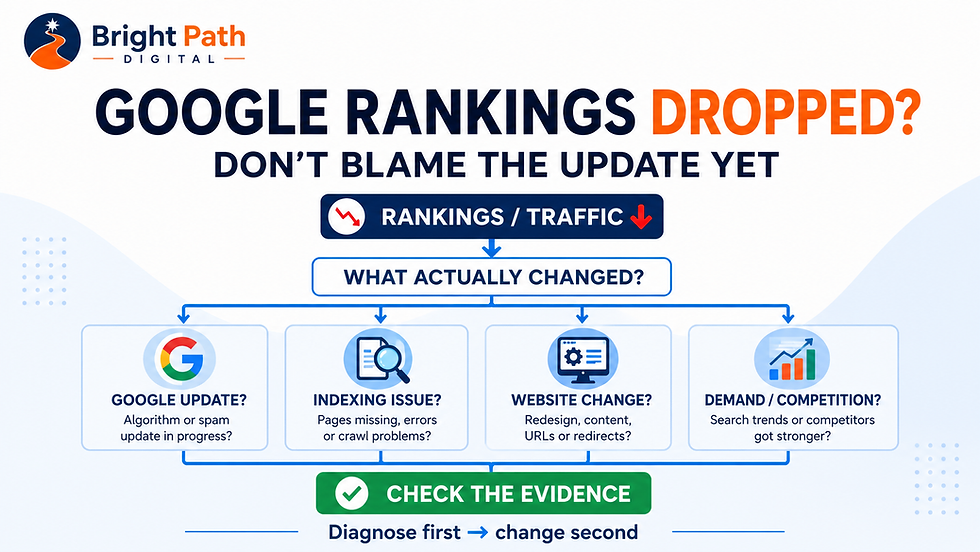
If the decline affects several pages or queries, use our Google rankings drop diagnostic guide to check algorithm updates, indexing, website changes, search demand and competition before deciding what to fix.
An important page has no impressions
First check whether the page is indexed.
If it is indexed, consider whether:
customers search for the subject
the wording reflects customer language
the page contains enough useful information
it overlaps with another page
the service and location are clear
relevant pages link to it
A page does not gain visibility simply because it exists.
The same applies to downloadable documents. Google can index PDFs, but if a menu, price list, brochure or other important customer information receives little visibility, consider whether the main information would work better as a normal web page. Our PDF vs web page for SEO guide explains how to make that decision.
Using Search Console for local SEO
Search Console can show whether service-and-location searches are generating impressions and clicks, but it should not be treated as the whole local SEO picture. Use it alongside Google Business Profile information, enquiry data, review activity and local listing checks.
A business serving Runcorn, Widnes or Warrington might review visibility across Halton and Cheshire. A Wallasey business might review searches connected with Wirral, Birkenhead, Liverpool and nearby locations.
Search Console does not provide precise town-by-town or postcode-level rankings.
Use it alongside:
Google Business Profile information
website analytics
genuine enquiries
customer feedback
local search checks
Our local SEO checklist for small businesses explains the wider foundations needed to improve local visibility.
Search Console does not replace website analytics
Search Console shows how people discover your website through Google Search.
Website analytics can show what visitors do after arriving, such as:
viewing another page
submitting a form
clicking a telephone number
requesting a quotation
completing a purchase
Use Search Console to assess search visibility and use analytics and conversion tracking to assess whether that visibility produces useful business results. Once somebody reaches your website, our guide to Google Analytics for small businesses explains which traffic, landing-page, engagement and enquiry measurements are worth reviewing next.
Should a Small Business Opt Out of Google's Generative AI Search Features?
Google now provides website owners with a Search Console control that can prevent their content from appearing in certain generative Search experiences, including AI Overviews, AI Mode and AI Overviews in Discover.
If you use the control to opt out, your website will stop receiving visibility and potential traffic from those affected generative Search features.
Google says this choice is not used as a ranking or inclusion signal for other parts of Google Search.
It is also important not to confuse this setting with AI model training controls. The Search Console setting controls participation in particular generative Search experiences; it is not Google's control for restricting model training.
So should a small business switch it off?
For most businesses trying to attract new customers, probably not by default.
If your objective is to increase the number of relevant people who discover your services, products or expertise, deliberately removing one potential discovery route needs a clear commercial reason.
There may be exceptions. A publisher, specialist information provider or business with particular content-licensing concerns may make a different decision.
But for a typical local or small service business, the sensible starting point is usually:
measure the visibility before deciding to remove it.
The important question is not whether AI visibility sounds good or bad.
It is whether appearing within these experiences helps relevant potential customers discover, remember or eventually choose your business.
Common mistakes to avoid
Checking every day
Daily figures fluctuate. Monthly comparisons are more useful for most small businesses.
Treating average position as an exact ranking
Average position combines different searches, devices, locations and circumstances.
Use it to identify trends rather than as a guaranteed ranking.
Changing pages too quickly
Repeatedly changing titles, headings and content makes it difficult to understand whether an improvement has worked.
Assuming every excluded page is a problem
Some URLs should not appear separately in search results. Focus on the pages that are valuable to customers.
Focusing only on traffic volume
More traffic is not always better traffic. Prioritise searches linked to your real services, service area and potential customers.
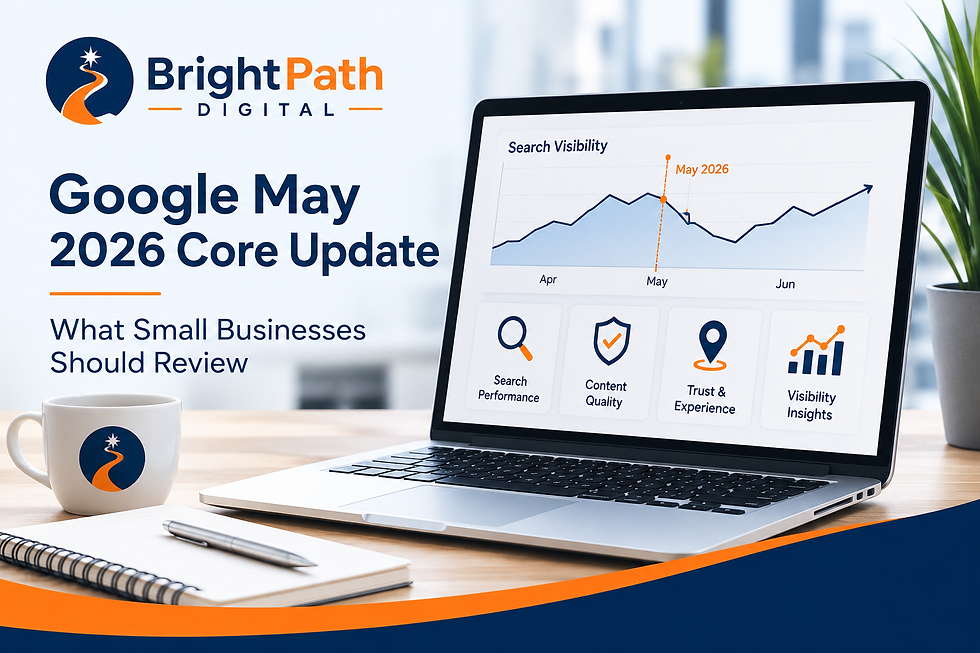
If you're investigating visibility changes around an algorithm update, see our guide to Google's June 2026 spam update.
Frequently asked questions
Is Google Search Console free?
Yes. Google Search Console is free for website owners and managers.
Does connecting Search Console improve rankings?
No. Connecting the tool does not directly improve your rankings. It provides information that can help you identify problems and make better-informed improvements.
How often should a small business check it?
For many small businesses, once a month is sufficient. You should also check it after publishing important pages, redesigning the website, changing domains or receiving a warning from Google.
Why do I have impressions but no clicks?
Your website may be appearing too low in the results, the page title may not attract attention or the page may be appearing for searches that are not closely relevant.
Can Search Console show exactly where I rank locally?
Not reliably for every town, postcode or customer. Average-position data combines different searches and circumstances.
Does Search Console replace Google Analytics?
No. Search Console explains how people find the website through Google Search. Analytics explains what they do after arriving.
Turn the information into action
Google Search Console is most valuable when it leads to a practical improvement.
Check it monthly, identify the strongest evidence and choose one or two actions rather than reacting to every movement.
If Search Console shows visibility but the website is still not producing enquiries, the issue may be the customer journey rather than the search data.
If you can see the data but are unsure what it means or which improvements should come first, request a BrightPath Digital Presence Review for a clear, prioritised assessment of your website, search foundations and customer journey.


Comments