What Digital Accounts Should a New Business Set Up First?
Updated: Aug 29
Starting a new business can quickly turn into an exercise in creating accounts.
A domain registrar.
Email.
A website builder.
Facebook.
Instagram.
LinkedIn.
Google.
Analytics.
Accounting software.
Cloud storage.
Booking systems.
Payment platforms.
Before long, you can have dozens of usernames, passwords, subscriptions and verification emails — some genuinely important and others created because somebody said you "should probably have one".
The better approach is to establish your digital foundations in the right order.
You do not need every platform on day one.
You need the accounts that allow your business to communicate professionally, establish its identity, protect its access and give potential customers somewhere reliable to find you.
Then add other systems when there is a clear reason for them.

Quick Answer: What Digital Accounts Should a New Business Set Up First?
For most new small businesses, the sensible order is:
Domain name
Business email
Password manager, recovery and two-step verification
Website account
Google Business Profile, if the business is eligible
Relevant social media accounts
Google Search Console and website analytics
Business cloud storage and collaboration tools
Booking, payment, accounting or CRM systems when actually required
The exact order can vary slightly.
A local tradesperson will have different needs from an online retailer.
A consultant may rely heavily on LinkedIn.
A salon may need a booking system immediately.
An ecommerce business will need payments from launch.
But the underlying principle remains the same:
Build the accounts the business depends on first. Add everything else because it solves a genuine problem — not because it appears on somebody's generic startup checklist.
1. Secure Your Domain Name Early
Your domain is a sensible place to start because it can underpin several other parts of your digital presence.
For example:
can become both:
and:
Even if your website is not ready yet, securing the right domain early can prevent somebody else registering it.
Before choosing one, think beyond whether it is available.
Ask:
Is it easy to spell?
Is it easy to say over the telephone?
Is it reasonably short?
Does it closely match the business name?
Could customers easily mistype it?
Is the relevant .co.uk, .com or other suitable extension available?
Are matching or similar social handles available?
Avoid buying dozens of domain variations unless there is a genuine reason.
Most small businesses need one clear primary domain, not a collection of speculative registrations.
Most importantly, make sure the domain is registered in an account your business understands and can access.
That becomes increasingly important as your website and email begin depending on it.
2. Set Up Proper Business Email
Once your domain is secured, professional business email should be one of the next priorities.
Compare:
with:
A Gmail, Outlook or other free address does not automatically make a business unprofessional, particularly when somebody is only testing an idea.
But once you are actively trading, a domain-based email address provides a more consistent foundation.
It also means you are not building every other business account around somebody's personal email address.
Depending on the business, you might create addresses such as:
hello@
info@
accounts@
bookings@
or individual staff addresses.
Do not create ten mailboxes just because you can.
Start with what you genuinely need.
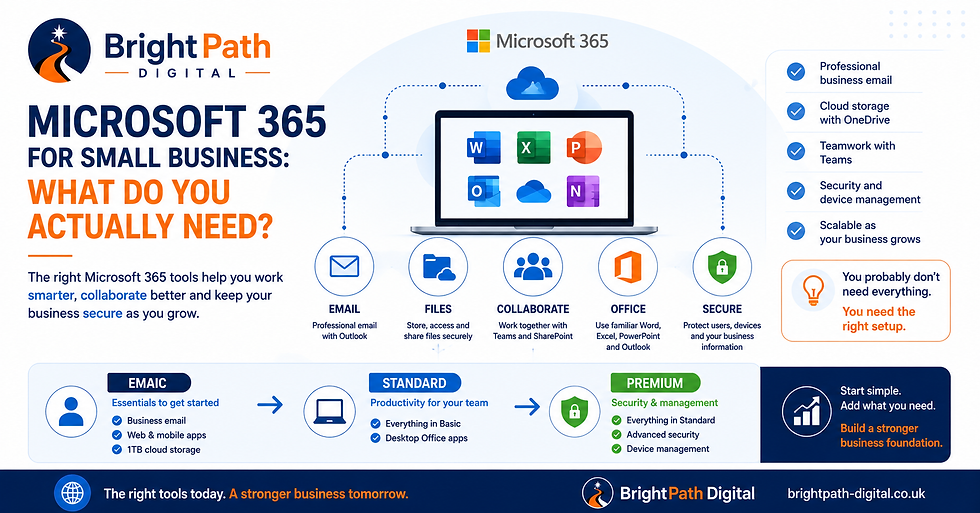
If you use Microsoft 365 or Google Workspace, the email account can also become part of a broader business setup covering calendars, cloud storage, documents, meetings and collaboration.
BrightPath's guide to what a new business actually needs to get started online looks at these wider foundations in more detail.
3. Secure the Accounts Before You Create Dozens More
This step is easy to ignore because security feels less urgent than creating the website or Facebook page.
That is backwards.
Your business email may eventually be capable of resetting passwords for:
your website
your social accounts
your domain
your Google accounts
your accounting system
your cloud storage
your booking software
and potentially other valuable services.
That makes email one of your most important accounts.
The UK's National Cyber Security Centre recommends using strong, unique passwords, a password manager and two-step verification for important accounts.
Before account numbers start multiplying:
choose an appropriate password manager
use unique passwords
turn on two-step verification where available
record suitable recovery methods
keep backup or recovery codes safely
avoid making one mobile phone your only route back into every account
This is much easier to establish when the business has five accounts than when it has fifty.
4. Create Your Website Account
You do not necessarily need a large website immediately.
But once people are being asked to trust your business, having a reliable online home becomes increasingly valuable.
Your first website may simply need to establish:
what you do
who you help
where you operate
why somebody should trust you
and:
how to contact you
We explore this in Does a New Business Need a Website, or Is Social Media Enough?.
For many active businesses, the strongest setup is not website or social media.
It is using each for a different purpose.
Social media can generate awareness and activity.
Your website gives people somewhere stable to understand the business, check important information and make contact.
If you are planning the website itself, our Professional Website for a New Business guide covers what that first site actually needs before launch.
Make Sure the Website Account Belongs to the Right People
If a web designer or agency creates the website for you, clarify how access will work.
They may need administrator access.
That is normal.
What you should avoid is reaching the end of the project without knowing:
who controls the website account
where the domain is registered
who pays the subscription
how you access the site
and what happens if you change supplier later.
Convenience is useful.
Dependency is not.
5. Create a Google Business Profile — If You Are Eligible
For many local businesses, a Google Business Profile should be one of the first customer-facing accounts established.
It can help people discover information about your business through Google Search and Maps, including your:
business name
location or service area
opening hours
telephone number
website
services
photographs
reviews
and other useful details.
There is an important qualification, though.
Not every business is eligible.
Google states that a business generally needs to make in-person contact with customers during its stated hours. Online-only businesses are not normally eligible for a Business Profile.
Check Google's Business Profile eligibility guidance rather than creating a profile that does not comply with its rules.
If you are eligible, create or claim the correct profile and make sure the business retains appropriate ownership access.
Google allows separate owners and managers, so an agency or employee does not need to share the business owner's Google password.
Once the profile exists, our 12-step Google Business Profile optimisation guide will help you complete it properly.
6. Reserve the Social Accounts You Actually Need
Facebook.
Instagram.
LinkedIn.
TikTok.
YouTube.
X.
Pinterest.
Threads.
A common startup mistake is opening an account on every platform and then abandoning most of them six weeks later.
That rarely creates a professional digital presence.
Five empty profiles are not automatically better than one or two useful ones.
There are really two decisions here.
Reserve Important Names
If your business name is available on platforms that you may realistically use, securing the appropriate username early can make sense.
This helps prevent naming inconsistencies later.
Decide Where You Will Actually Be Active
That decision should depend on your customers and the type of content you can realistically produce.
A B2B consultant may prioritise LinkedIn.
A photographer may get more value from Instagram.
A local community business might find Facebook particularly useful.
A visually demonstrable service could benefit from short-form video.
Do not choose a platform simply because it is fashionable.
Ask:
Are the people we want to reach actually here, and can we give them something useful?
If you are deciding which network deserves your attention first, our guide to Facebook vs Instagram vs LinkedIn for Small Business compares the three platforms based on customer type, content and what you want social media to achieve.
If LinkedIn emerges as your likely primary platform, our dedicated guide to LinkedIn for Small Business in 2026: Is It Worth It? explains what to set up, whether to use a personal profile or Company Page, what to publish and how to tell whether the time investment is worthwhile.
Our article Social Media Isn't Just About Followers Anymore explains why relevant reach matters more than simply accumulating followers.
7. Set Up Google Search Console When the Website Goes Live
Google Search Console is not something your customers see.
That does not make it unimportant.
It helps you understand how Google discovers and sees your website, including:
which pages Google knows about
whether pages can be indexed
which searches are generating impressions and clicks
whether Google is reporting particular technical issues
and how individual URLs are being processed.
Google requires website ownership to be verified before full Search Console access is provided.
Its Search Console setup guidance explains the process.
Ideally, the business itself should retain appropriate ownership access.
Do not leave Search Console until six months after launch.
If you begin collecting data from the start, you have something useful to compare as the website develops.
8. Set Up Website Analytics — But Know Why You Are Doing It
Analytics can help you understand what happens after somebody reaches your website.
Depending on the setup, you may want to understand:
where visitors arrive from
which pages they view
which content attracts attention
whether important buttons are being used
which marketing activity generates useful traffic
and whether visitors eventually make contact.
Google Analytics is one common option and provides specific setup guidance for CMS platforms including Wix.
But installing analytics should not become an excuse to collect data you will never use.
Start with questions the business genuinely needs answered.
Also remember that analytics and other tracking technologies can introduce privacy and cookie considerations.
The Information Commissioner's Office provides small-business guidance on cookies and privacy notices.
Do not simply install every tracking tool somebody recommends and assume the legal/privacy side takes care of itself.
9. Create Business Cloud Storage Before Files Scatter Everywhere
At first, documents tend to live wherever is convenient.
A quotation sits on one laptop.
The logo is in somebody's Downloads folder.
Customer photographs are on a phone.
The latest price list is emailed between two people.
Invoices are somewhere else.
That becomes painful surprisingly quickly.
A new business should decide where important working files belong.
Depending on your preferred platform, that might involve Microsoft 365 and OneDrive/SharePoint, Google Workspace and Google Drive or another suitable business cloud platform.
Create a sensible structure for things such as:
Finance
Customers
Marketing
Brand assets
Website
Suppliers
Policies
Templates
The objective is not complicated document management.
It is knowing where the current version lives.
The NCSC also recommends backing up the data a business needs to operate, which can include documents, contacts, emails, website data and invoicing information.
10. Add Booking, Payment, Accounting and CRM Accounts When the Business Needs Them
These accounts can be essential.
They are not universally first-day priorities.
A salon may need online booking immediately.
An ecommerce business obviously needs payment functionality.
A consultant may need accounting software from the start but no booking platform.
A tradesperson may initially manage a small number of enquiries without a full CRM.
This is where new businesses can overspend.
It is very easy to assemble:
£20 per month here.
£35 there.
£15 for another app.
£50 for another system.
Suddenly the business has hundreds of pounds of monthly software subscriptions before it has enough customers to justify them.
The test is simple:
What problem does this account solve today?
If the answer is unclear, you may not need it yet.
A spreadsheet is not the right answer to everything.
But neither is buying enterprise software for a business with three customers.
What Should You Avoid Setting Up Too Early?
Not everything advertised as essential actually is.
Be cautious about immediately committing to:
a complicated CRM nobody will maintain
five social media platforms
expensive marketing automation
multiple email-marketing systems
advanced reporting dashboards
paid advertising accounts before you understand the offer
large cloud-software bundles full of unused products
specialist project-management software for a one-person business
multiple overlapping booking or payment tools
The objective is not to have the most software.
It is to create a digital setup that makes running the business simpler.
Every new account creates something else to:
pay for
secure
update
manage
recover
document
and eventually remove if you stop using it.
Complexity has a cost.
A Better Order for Your First Few Weeks
Before You Start Promoting the Business
Prioritise:
Domain → business email → password/security setup
These establish the identity and access foundations the other accounts can build on.
Before You Start Actively Taking Enquiries
Add:
Website → Google Business Profile if eligible → relevant social accounts
These give customers somewhere to find, understand and contact you.
When the Website Goes Live
Add:
Google Search Console → appropriate analytics → privacy/cookie configuration
That means you begin collecting useful website and search information from the start.
As the Business Begins Operating
Add the systems genuinely required for:
documents → accounting → bookings → payments → CRM → collaboration
The exact order now depends on how your business works.
One More Account Is Not Always the Answer
The digital setup for a new business should be deliberately simple.
A useful foundation might initially consist of:
one domain
one professional email system
one website
one properly configured Google Business Profile, if eligible
one or two relevant social platforms
properly secured accounts
one place for important business files
basic search and website measurement
That is enough for many businesses to begin.
You can expand later.
The mistake is assuming sophistication comes from having more platforms.
It does not.
A well-organised small setup is usually more valuable than a complicated collection of poorly managed accounts.
Keep Business and Personal Accounts Separate Where Practical
Using your personal accounts for everything feels easier at the beginning.
It becomes harder later.
A personal email address creates the website account.
That personal account creates the social pages.
The same phone receives every verification code.
Personal cloud storage holds all the business files.
Then the business employs somebody, works with an agency or needs to hand responsibility to another person.
Untangling everything can be difficult.
Where platforms support business accounts, separate users, administrators or delegated access, use them appropriately.
You do not have to build an enterprise IT department.
You simply need to make sure the business can continue operating without depending permanently on one personal login.
Document What You Have Created
Once the accounts exist, create a basic digital asset register.
For each important platform, record:
what it is
which provider you use
who owns or administers it
which business email is associated with it
who pays for it
whether two-step verification is enabled
where recovery information is held
when it renews
Do not turn the spreadsheet into a list of passwords.
Passwords belong in an appropriate password manager.
The register exists so that six or twelve months later you are not asking:
“Who actually set this up?”
That question becomes especially important as the business grows.
Frequently Asked Questions
What Online Accounts Does a New Business Need?
Most new businesses should start with a domain, professional email, secure account management, a website and the customer-facing platforms relevant to how they trade.
Local businesses may also benefit significantly from an eligible Google Business Profile.
Analytics, Search Console, cloud storage, accounting, payments, booking and CRM tools should then be added according to genuine business needs.
Should I Set Up Business Email Before My Website?
You can.
Once you control your domain, business email can usually be configured before the full website is ready.
That gives you a professional address to use when establishing other business accounts.
Should a New Business Set Up Every Social Media Platform?
No.
Secure important usernames where sensible, but concentrate your active effort on the platforms most relevant to your customers and content.
Maintaining several abandoned profiles provides little value.
Does Every Business Need Google Business Profile?
No.
Google Business Profile is aimed at eligible businesses that interact with customers in person.
Online-only businesses are generally not eligible.
Check Google's current eligibility guidance before creating a profile.
When Should I Set Up Google Search Console?
Set it up when your website goes live — or as part of the launch process.
That lets Search Console begin collecting information about how Google discovers and processes the site from an early stage.
Should I Use Microsoft 365 or Google Workspace?
Either can provide professional email and useful business tools.
The better choice depends on how you work, which applications you prefer, what your team needs and what systems you may need to integrate later.
Do not choose purely because somebody tells you one platform is universally better.
Do I Need a CRM When I Start a Business?
Not necessarily.
If the volume of leads and customer interactions is small, a full CRM may introduce more administration than value.
Introduce one when it helps you manage a genuine process that is becoming difficult to control manually.
Start Simple. Own It. Secure It. Then Grow It.
A new business does not need fifty digital accounts.
It needs the right foundations.
Start with the things that establish and protect your identity:
domain
business email
security
Then establish where customers will find and trust you:
website
relevant social media
Then establish how you will learn and operate:
Search Console
analytics
business systems
Most importantly, make sure the business retains appropriate control over the accounts being created.
The objective is not simply to get online quickly.
It is to build a digital setup you can still understand, manage and expand several years from now.
BrightPath Digital helps startups and small businesses put these foundations in place without unnecessary complexity — from domains, professional email and websites through to Microsoft 365, visibility, security and the systems needed as the business grows.
If you need a professional website and core digital setup to get started, explore the BrightPath Digital Launch Package, or request a website design consultation if you are unsure where to start.


Comments