Microsoft 365 for Small Business: What Do You Actually Need?
You decide your business needs Microsoft 365.
Then things get complicated.
Business Basic.
Business Standard.
Business Premium.
Teams.
OneDrive.
SharePoint.
Exchange.
Intune.
Defender.
Bookings.
Planner.
Forms.
Copilot.
Before long, what sounded like “we just need business email and Microsoft Office” has turned into a catalogue of products, licences and features.
The good news is that most small businesses do not need to use everything Microsoft 365 includes.
The better question is:
What does your business actually need Microsoft 365 to do?
For many small businesses, the answer is surprisingly straightforward:
professional email
proper file storage
Microsoft Office applications
shared calendars
safe collaboration
secure user accounts
And, as the business grows:
better control over devices
stronger access controls
improved security
Everything else should earn its place.
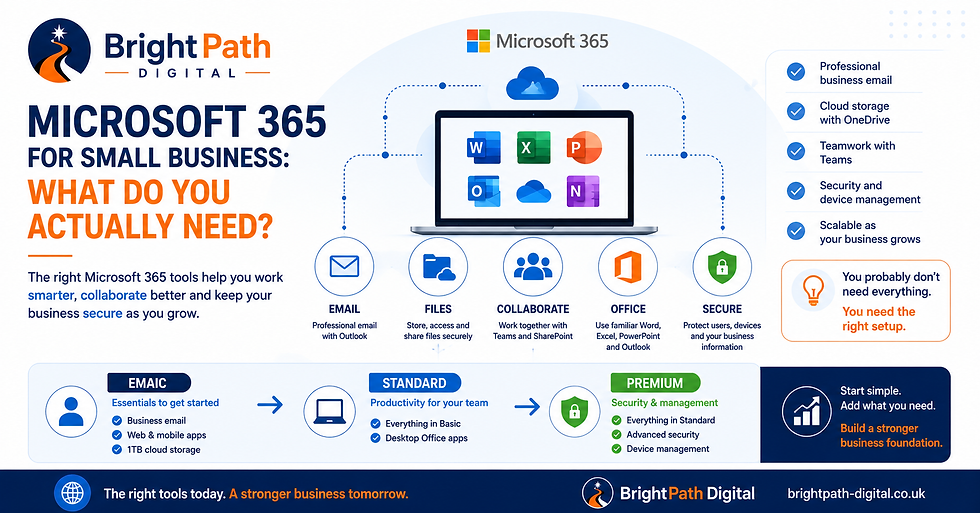
Quick Answer: What Microsoft 365 Does a Small Business Actually Need?
For a typical small business, I would prioritise Microsoft 365 in this order:
Professional business email
OneDrive for individual working files
SharePoint for shared company files
Word, Excel, PowerPoint and Outlook
Multi-factor authentication and secure user accounts
Teams if the business genuinely needs chat, meetings or collaboration
Shared mailboxes and calendars where useful
Device management and enhanced security as the team grows
Bookings, Forms, Planner and other applications when they solve a real process
Copilot when there is a genuine productivity case and your information access is properly controlled
You do not need to activate every application because it happens to be included in your licence.
And you should not automatically buy the most expensive Microsoft 365 plan simply because it contains more features.
Start with the business problem. Then choose the technology.
Microsoft 365 Is More Than Word and Excel
A common misunderstanding is that Microsoft 365 is simply a subscription version of Microsoft Office.
Word, Excel, PowerPoint and Outlook are certainly part of it.
But for a business, some of the most useful services sit behind those familiar applications.
Microsoft 365 can provide:
business email
calendars
contacts
file storage
file sharing
collaboration
video meetings
user accounts
access controls
device management
security tools
booking systems
forms
task management
automation
AI tools
That is why the choice should not simply be:
“Which version of Office should we buy?”
It should be:
“How do we want our business email, files, people and devices to work together?”
1. Start With Professional Business Email
For many small businesses, business email is one of the most valuable reasons to use Microsoft 365.
Instead of:
you can use:
or:
That immediately creates a more consistent business identity.
But the benefit is not just appearance.
A properly configured Microsoft 365 environment gives you central administration.
If an employee joins, you create an account.
If somebody leaves, you can remove their access.
If you need another mailbox, shared address or calendar, it can be managed centrally.
That is a much stronger foundation than allowing everybody to create their own personal email accounts.
If you are still establishing your wider digital setup, our guide to What Digital Accounts Should a New Business Set Up First? explains why your domain and business email should be among the first things you organise.
Useful Business Email Addresses
Depending on your business, you might need addresses such as:
But do not automatically buy a separate full Microsoft 365 licence for every address.
Some addresses may be better configured as shared mailboxes used by appropriately licensed employees.
For example:
accounts@
could be accessed by two authorised members of staff without becoming another employee with another separate desktop and identity.
The right setup matters more than the number of mailboxes.
2. Use OneDrive for Personal Working Files
OneDrive is primarily your individual cloud file storage.
Think of it as a modern alternative to keeping important working documents only in:
Documents
Desktop
or:
a folder on your laptop
A sensible OneDrive setup means your working documents are associated with your business account rather than existing only on one physical computer.
For example:
OneDrive – Mike
might contain:
personal working documents
drafts
individual spreadsheets
temporary project files
notes
But there is an important distinction.
OneDrive should not automatically become your company's filing cabinet.
If several employees need access to the same business files, SharePoint normally deserves consideration.
3. Use SharePoint for Company Files
This is where many small businesses get Microsoft 365 wrong.
A business starts with one employee.
Everything gets saved in that person's OneDrive.
Then a second employee joins.
So Mike shares his folders with Sarah.
Then Sarah creates another folder and shares it back with Mike.
Then employee number three arrives.
Soon nobody is quite sure:
where the original document lives
which copy is current
who owns the folder
who can access it
what happens when somebody leaves
The underlying problem is that personal file storage has become company file storage.
SharePoint is designed for shared organisational information.
Instead of:
Mike's OneDrive → Customers → Quotes
you might have:
Company SharePoint → Sales → Quotes
or:
Company SharePoint → Operations → Customers
The documents then live within a business-controlled shared environment rather than depending on one employee's personal storage.
A Simple Rule
Use:
OneDrive = my files
and:
SharePoint = our files
It is not technically that simple in every scenario, but it is a useful working rule for most small businesses.
4. Do You Actually Need Microsoft Teams?
Maybe.
But do not deploy Teams simply because Microsoft 365 includes it.
Teams can be genuinely useful for businesses that need:
video meetings
internal chat
project conversations
shared files
channels
collaboration
screen sharing
communication between locations
remote or hybrid working
For a five-person office where everybody sits beside each other, it may have a smaller role.
For a ten-person business split between an office, home workers and people on customer sites, it may become much more valuable.
The mistake is turning Teams into another application employees are expected to monitor without deciding what it is actually for.
If you use it, establish some basic rules.
For example:
Email: external or formal communication
Teams chat: quick internal conversations
Teams channels: project or departmental conversations
SharePoint: shared company documents
That prevents information becoming scattered across five different places.
5. Do You Actually Need Desktop Word, Excel and Outlook?
This is one of the main practical decisions when comparing Microsoft 365 plans.
Microsoft's business plans can provide different combinations of cloud services and desktop applications.
You can compare the current options on the official Microsoft 365 business plans page.
The important question is not:
“Do we use Word?”
It is:
“Do our employees need Word, Excel, PowerPoint and Outlook installed on their computers?”
Someone working heavily with:
Excel spreadsheets
complex Word documents
Outlook
PowerPoint presentations
offline files
will often benefit from having the desktop applications.
A lightweight business that primarily works through a browser may not need them for every employee.
Do not pay for desktop applications nobody uses.
But equally, do not save a few pounds per user and then make your employees work around limitations every day.
Microsoft 365 Business Basic: Who Is It For?
Business Basic can be a good fit when your main requirements are things such as:
professional business email
cloud storage
SharePoint
browser and mobile Office applications
collaboration
Teams where appropriate to the chosen plan
Forms
Planner
Bookings
It can be particularly worth considering for:
very small businesses
light Office users
browser-based workers
employees who do not need installed desktop Office
secondary or occasional users
It can also make sense when some employees need full desktop applications and others do not.
You do not necessarily have to give every employee exactly the same Microsoft 365 licence.
Microsoft 365 Business Standard: Who Is It For?
For many conventional small businesses, Business Standard is the natural productivity option to compare.
Its major attraction is combining Microsoft 365 cloud services with the familiar desktop Office applications.
That makes it a stronger fit for people who spend their working day using:
Outlook
Word
Excel
PowerPoint
alongside:
business email
OneDrive
SharePoint
collaboration tools
If your Microsoft 365 requirement is mainly about productivity and collaboration, Standard is often worth comparing with Business Basic.
But that does not automatically make it the right long-term choice if you also need stronger control over company devices, user access and security.
That is where Business Premium becomes more relevant.
Microsoft 365 Business Premium: When Is It Worth It?
Business Premium is sometimes treated as:
“Business Standard, but more expensive.”
That misses the main point.
The reason to consider Business Premium is not simply more productivity software.
It is the additional security, identity and device-management capability it can provide.
That becomes much more important when your business needs to control:
how users sign in
which devices access company information
how company laptops are configured
endpoint security
access policies
what happens when a laptop is lost
access from unmanaged devices
company information on employee devices
When I Would Seriously Consider Business Premium
I would give it serious consideration once your business has several employees using company laptops.
Likewise if employees:
work remotely
access sensitive customer information
handle financial information
use business-owned devices
access Microsoft 365 from multiple locations
need stronger phishing protection
work in a regulated environment
store commercially sensitive information
At that point Microsoft 365 is no longer merely an Office subscription.
It is becoming part of your wider IT and security foundation.
BrightPath's Scale & Secure Package is aimed at exactly this stage: when a growing business needs to think beyond email and Office applications and start putting stronger access, device and security controls around its technology.
Business Premium Is Not a Substitute for Setting It Up Properly
This needs emphasising.
Buying a more advanced Microsoft 365 licence does not automatically secure your company.
You still need to configure it properly.
Imagine paying for capabilities that can help with:
device management
endpoint protection
access controls
stronger identity security
and then never configuring them.
You are paying for potential protection rather than actually using it.
Good Microsoft 365 security involves decisions such as:
enabling appropriate multi-factor authentication
controlling administrator accounts
reviewing old users
configuring device policies
protecting company laptops
setting sensible external sharing rules
securing email
controlling access
documenting recovery processes
Licence configuration.
That distinction matters.
Every Business Should Protect Its User Accounts
Whatever plan you choose, protecting user accounts should be an early priority.
A password alone should not be the only thing standing between an attacker and your:
email
customer conversations
business documents
invoices
cloud files
contacts
Multi-factor authentication should therefore form part of the basic setup.
The bigger risk is often not that Microsoft lacks security functionality.
It is that a business never properly configures the protection it already has.
What About Microsoft Bookings?
Bookings can be genuinely useful for the right type of business.
It can make sense if customers regularly need to book:
consultations
appointments
demonstrations
meetings
services
For example, a consultant could allow potential customers to schedule an initial call.
A service business could potentially use it for appointments.
But if customers never book scheduled appointments, you do not need to introduce a booking system simply because it appears in Microsoft 365.
Use the tool when it solves a problem.
What About Microsoft Forms?
Forms is relatively simple but potentially useful.
You could use it for:
staff questionnaires
customer feedback
internal requests
onboarding information
surveys
event registration
simple checklists
Again, this does not mean every business needs dozens of forms.
If an existing process already works well, do not introduce another system without a reason.
What About Microsoft Planner?
Planner can help a small team organise:
tasks
projects
responsibilities
deadlines
It becomes useful when people are repeatedly asking:
“Who is doing that?”
or:
“Where are we up to with this?”
For a one-person business, it may add unnecessary administration.
For a growing team with recurring work, it can provide useful visibility.
But do not confuse having a task-management application with actually managing tasks well.
The process still matters.
What About SharePoint Intranets?
You can build sophisticated SharePoint intranets.
That does not mean a six-person business needs one.
For many small businesses, a straightforward SharePoint structure containing areas such as:
Company
Sales
Operations
Finance
Marketing
may be enough.
Start simple.
You can add:
policies
procedures
company news
forms
internal resources
departmental areas
later if there is a genuine need.
One of the easiest ways to make Microsoft 365 unnecessarily complicated is to build an enterprise-style SharePoint environment for a company that only needs somewhere sensible to keep shared files.
What About Microsoft Copilot?
Copilot deserves a separate decision.
Do not automatically give everybody a paid AI licence simply because AI is fashionable.
Start with:
What would employees actually use it for?
Examples might include:
summarising meetings
drafting documents
analysing information
working with email
preparing presentations
finding information
assisting with repetitive knowledge work
Then ask:
Is that worth the additional cost for this employee?
An employee spending hours each week creating documents, analysing data or dealing with large volumes of information may gain meaningful value.
Another employee may barely use it.
There is also an information-governance issue.
Before allowing AI to work extensively with company information, understand who can already access which data.
Your Microsoft 365 permissions become even more important when AI can help somebody discover and summarise information quickly.
AI does not fix poor permissions. It can make them much more visible.
If your business is beginning to use AI, our guide to What Business Information Should You Never Put Into AI Tools? explains why information access and AI usage need to be considered together.
Do All Employees Need the Same Microsoft 365 Licence?
Not necessarily.
Imagine a ten-person business.
You might have:
Office Employees
They need desktop Word, Excel, PowerPoint and Outlook.
Field Employees
They mainly need email and appropriate cloud access.
Managers
They handle more sensitive information and use company-managed laptops.
Their requirements are different.
A mixed licensing model can therefore sometimes save money.
But there is a trade-off.
The more licence combinations you introduce, the more complicated administration becomes.
For a very small business, saving a few pounds per month while creating a confusing licensing matrix may not be worth it.
Optimise intelligently, not obsessively.
What About Microsoft 365 Apps for Business?
Microsoft also offers Office application-focused licensing options.
These can provide desktop Microsoft applications and cloud storage without necessarily representing the same complete business setup as plans centred around Exchange email, collaboration and broader organisational services.
That can be appropriate in certain situations.
But if your requirement is:
“We need Microsoft 365 to run our business email, users, files and collaboration.”
start by comparing the main Microsoft 365 Business plans rather than simply looking for the cheapest way to get Word and Excel.
Check the latest options on Microsoft's business plans comparison.
A Practical Microsoft 365 Setup for a One-Person Business
If you are a sole trader or one-person limited company, keep it simple.
You may need:
Business Email
Your professional domain email address.
OneDrive
For working files.
Office Applications
Desktop or web depending on how you work.
Multi-Factor Authentication
To protect the account.
Possibly:
Bookings
If customers regularly schedule appointments.
You probably do not need a complicated SharePoint structure, dozens of Teams channels or enterprise-style device policies on day one.
Build for the business you have.
Not the 500-person company you might become.
A Practical Microsoft 365 Setup for a Five-Person Business
Now things begin to change.
I would start thinking about:
Individual User Accounts
One account per person.
Professional Email
No shared personal logins.
Shared Mailboxes
For addresses such as accounts@ or enquiries@ where appropriate.
OneDrive
For individual files.
SharePoint
For shared company documents.
Teams
If it genuinely improves communication and collaboration.
Multi-Factor Authentication
For everybody.
Access Review
Who can access what?
Joiner and Leaver Process
What happens when someone starts or leaves?
Security
Particularly if employees use business laptops.
This is broadly where the Microsoft 365 element of the BrightPath Digital Growth Package fits: professional email, OneDrive, SharePoint and Teams configured as part of a wider small-business digital foundation rather than simply selling licences and leaving you to work everything out.
A Practical Microsoft 365 Setup for a Growing 10–30 Person Business
At this size, I would stop thinking purely about Office applications.
You are now managing:
identities
devices
access
company information
onboarding
offboarding
security
permissions
The consequences of weak administration increase.
Questions become:
What happens when a laptop is stolen?
Can former employees still sign in?
Are company devices encrypted?
Can somebody access everything from an unmanaged personal computer?
Who has administrator rights?
Are users adequately protected from phishing?
Can we remove company data when somebody leaves?
Are shared files stored in the correct place?
This is where more advanced Microsoft 365 management and security can become significantly more valuable.
Five Microsoft 365 Mistakes Small Businesses Make
1. Sharing One Account Between Several People
Do not create:
and give five employees the same password as their everyday login.
Give people individual identities.
Use shared mailboxes and permissions where appropriate.
2. Keeping Company Files in One Employee's OneDrive
OneDrive is associated with an individual account.
Company information should be structured accordingly.
Use SharePoint for appropriate shared business content.
3. Giving Everyone Administrator Access
Most users do not need administrator privileges.
Your everyday account should not automatically become the master key to the entire company.
Give people only the level of access their role requires.
4. Paying for Security Features but Never Configuring Them
Advanced licences are valuable because of what they allow you to control.
If nobody configures those capabilities, much of the benefit is wasted.
5. Turning On Every Microsoft Application
The Microsoft 365 environment can quickly become overwhelming.
Employees do not need to learn ten new applications simply because they appear in the menu.
Introduce tools when there is a clear business reason.
Microsoft 365 Should Simplify the Business
A useful Microsoft 365 environment might look like this:
Outlook
Email and calendars.
↓
OneDrive
My working files.
↓
SharePoint
Our shared company files.
↓
Teams
Our conversations and collaboration.
↓
Security and device management
Protect the people, devices and information using them.
That is enough structure for many small businesses.
The objective is not:
“Use as much Microsoft 365 as possible.”
The objective is:
“Make it obvious where work happens.”
Which Microsoft 365 Plan Should a Small Business Choose?
A simple starting point is:
Consider Business Basic if:
You mainly need:
business email
cloud storage
Microsoft 365 online services
browser/mobile Office applications
and do not require desktop Office for that user.
Consider Business Standard if:
You also need the installed desktop versions of:
Word
Excel
PowerPoint
Outlook
and your main priority is productivity and collaboration.
Seriously Consider Business Premium if:
You need desktop applications and want stronger:
device management
identity controls
email protection
endpoint security
access controls
particularly when employees use company devices, work remotely or handle valuable information.
Always check the current Microsoft 365 business plan comparison before purchasing, because Microsoft's packages and available options can change.
Do Not Choose Microsoft 365 on Price Alone
The cheapest licence is not automatically the cheapest solution.
Suppose a lower-cost plan saves a few pounds per employee.
But those employees need desktop Excel every day.
You saved money on the licence.
You created frustration in the working environment.
Likewise, buying the most advanced plan for everyone but never configuring any of its additional security capabilities is not clever either.
You paid more.
You did not necessarily receive more protection.
Look at:
what employees actually do
which devices they use
where they work
which information they access
which applications they genuinely need
how much security and control the business requires
Then choose the licences.
Do Not Forget Who Controls the Microsoft 365 Environment
There is one final issue that matters more than many businesses realise.
Who controls your Microsoft 365 environment?
Who has administrator access?
Who receives billing notifications?
Who controls the domain?
Who can recover administrator access?
Does your IT supplier have access?
Can the business remove that supplier's access?
What happens if your usual administrator becomes unavailable?
Do not allow something as important as your company's:
email
documents
user accounts
security
collaboration
to depend permanently on one freelancer's login or one employee's personal mobile phone.
Microsoft 365 should remain under the control of the business.
Suppliers should be given the access required to support it.
That is a fundamentally healthier arrangement.
This is part of a wider digital ownership issue. Our guide to Does Your Business Actually
Own Its Website, Domain and Social Media Accounts? explains why access, ownership and recovery should be documented across all of your important digital services.
A Microsoft 365 Small Business Checklist
Before deciding what you need, answer these questions.
Do you need professional domain-based email?
Office
Do employees need desktop Word, Excel, PowerPoint and Outlook?
Files
Which documents are personal working files and which belong to the company?
Collaboration
Would Teams genuinely make communication easier?
Devices
Does the business own or manage employee laptops?
Remote Work
Do employees access company information from different locations or devices?
Security
How sensitive is the information employees handle?
Access
What happens when someone joins or leaves?
Bookings
Do customers need to schedule appointments?
AI
Is there a genuine productivity case for Copilot, and are your permissions and AI policies ready for it?
Your answers will usually make the appropriate Microsoft 365 setup considerably clearer.
Frequently Asked Questions
Is Microsoft 365 Worth It for a Small Business?
For many businesses, yes.
Professional email, cloud file storage, Office applications and central user administration can create a much stronger business foundation than a collection of personal email addresses, local files and unrelated applications.
The value comes from using the parts that solve genuine business problems.
Is Microsoft 365 Business Basic Enough for a Small Business?
It can be.
If you mainly require professional email, cloud storage, SharePoint and browser/mobile Office applications, Business Basic may cover what you need.
If employees require installed desktop Office applications, compare Business Standard.
If you also need stronger device, identity and security management, compare Business Premium.
What Is the Difference Between Business Standard and Business Premium?
The important difference is not simply productivity applications.
Business Premium adds a substantially stronger security and management layer.
That can become important for businesses with employees, company computers, remote working or sensitive information.
Does Microsoft 365 Business Basic Include Outlook?
Microsoft 365 business plans can include Outlook services, but the availability of installed desktop applications varies by plan.
If you specifically need desktop Outlook, check the current Microsoft plan comparison before choosing your licence.
Do I Need SharePoint if I Already Have OneDrive?
Potentially.
Use OneDrive primarily for an individual's working files.
Use SharePoint where documents need to belong to and be shared across the wider business.
Do not build your entire company's filing structure inside one employee's OneDrive simply because sharing folders is easy.
Does a Small Business Need Teams?
Not automatically.
Teams is useful where chat, meetings, remote working and collaboration solve real communication problems.
A tiny co-located business may use it much less.
Does a Small Business Need Microsoft 365 Business Premium?
Not every small business does.
But it deserves serious consideration once you need to manage employee devices, strengthen user-access controls or protect valuable business information across multiple people and locations.
Should Every Employee Have the Same Microsoft 365 Licence?
No.
Different employees can have different requirements.
However, avoid creating an unnecessarily complicated licensing structure simply to save tiny amounts of money.
Does Microsoft 365 Automatically Back Up Everything?
Do not assume that having information inside Microsoft 365 removes the need to think about backup, retention and recovery.
Cloud storage and backup solve related but different problems.
What your business needs depends on the information involved and the consequences of losing it.
Should a Small Business Buy Microsoft Copilot?
Only where there is a convincing use case.
Do not start with:
“AI is popular, so everybody needs a licence.”
Start with:
“Which employees have repetitive knowledge work that AI could materially improve?”
Then consider the benefit, data access, security and governance before rolling it out more widely.
Final Thought: Buy What You Need — Configure What You Buy
The strongest Microsoft 365 environment is not the one with the most licences.
It is the one where:
every employee has their own account
business email looks professional
files are stored in the right place
people know where to collaborate
access is properly protected
company devices are managed where necessary
former users can be removed cleanly
and:
the business remains in control
For a one-person business, that can be extremely simple.
For a growing team, Microsoft 365 can gradually become part of the company's wider IT and security foundation.
The trick is knowing when to make that transition.
Do not buy every Microsoft product on day one.
But equally, do not wait until you have twenty employees, five years of company files and a security incident before organising the basics properly.
Start simple. Structure it properly. Add control as the business grows.
BrightPath Digital helps small businesses set up Microsoft 365 around the way they actually work — including professional email, OneDrive, SharePoint, Teams and practical security foundations.
For small teams needing Microsoft 365 alongside a stronger website and wider digital setup, explore the BrightPath Digital Growth Package.
If your business has grown to the point where device management, user access and security need more control, take a look at the Scale & Secure Package.
Or, if you are not sure which Microsoft 365 setup makes sense for your business, contact BrightPath Digital for a straightforward discussion about what you actually need.


Comments